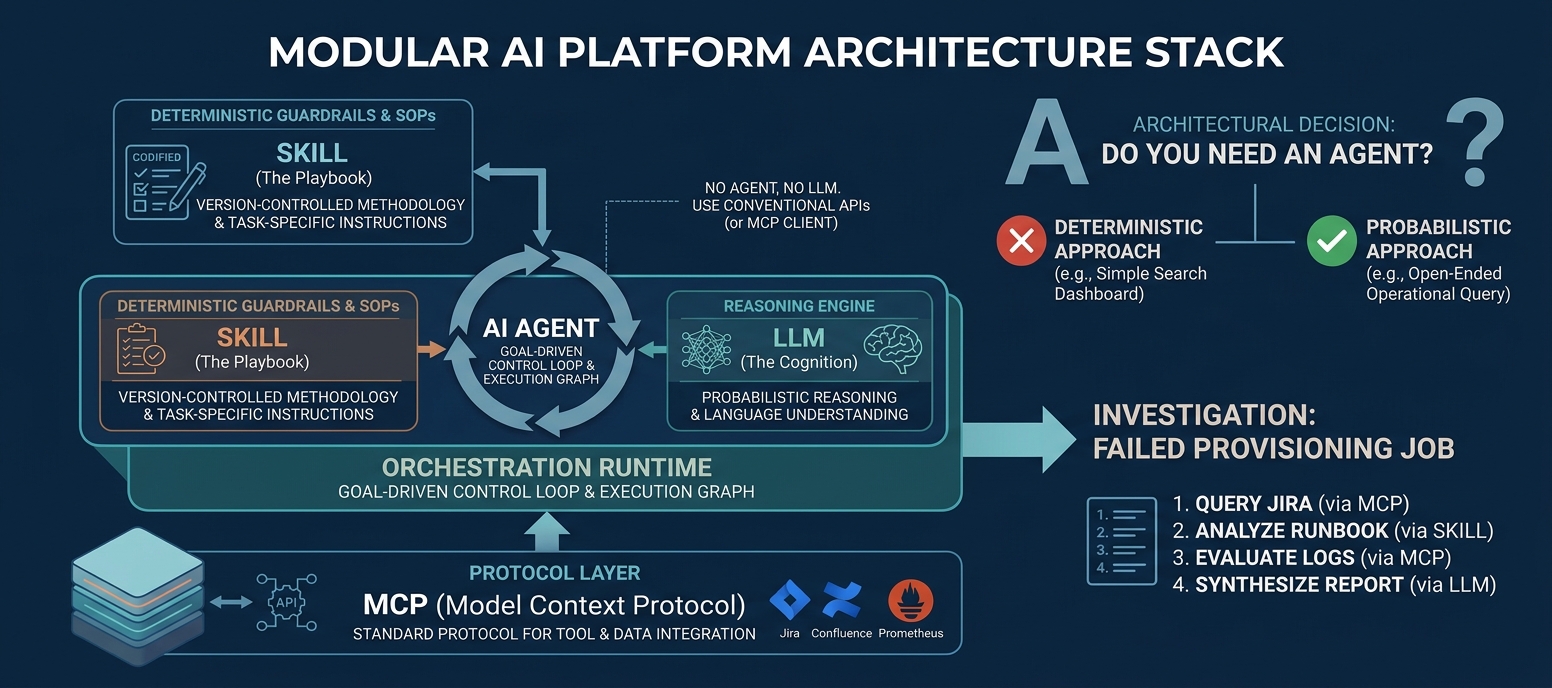
What once required custom-built agents can now often be done with a simple Skill and an AI assistant. But does that mean agents are becoming obsolete? Not quite. The real shift is understanding when you need a Skill, an agent, or both.
1. Think of it this way
Skill = How to do the job
A reusable package of instructions, procedures, rules, and domain knowledge: typically a folder with a SKILL.md file plus optional scripts and reference files that the AI loads when a task matches.
Example: A maintenance report Skill tells Claude which Slack channels to check, which Jira tickets qualify, and how to structure the report.
Agent = A system that carries out a goal
An AI-driven setup that can decide what steps to take, use tools, respond to results, and continue working toward an objective.
Example: An agent investigates a provisioning failure, gathers evidence from Jira and Slack, identifies possible causes, and prepares an incident analysis.
MCP = How the AI accesses systems
An open standard, introduced by Anthropic in November 2024, for connecting AI applications to external tools and data. The AI app acts as a client and talks to MCP servers that expose those tools. MCP provides the connection; your permissions and approvals control what the AI may actually do.
Example: Accessing your company’s Jira, Slack, and Salesforce through approved connections.
2. A Real-World Example: The Weekend Maintenance Report
To put this into practice, I built a Skill for generating a weekend maintenance report using information from systems like Jira, Slack, and Salesforce.
Rather than building a custom AI agent, I simply asked Claude to read and execute the Skill. The Skill defined the workflow, the rules for gathering and analyzing information, and the expected report format. With the necessary connectors configured, Claude could carry out the task using those instructions.
This is a practical example of how an AI assistant, combined with a well-defined Skill and access to the right tools, can perform a multi-step task without requiring a separately built agent.
Let’s walk through how it works.
3. When do you actually need an agent?
Here are four practical scenarios.
Skill + AI vs. a custom agent or workflow
| Capability | Skill + AI | Custom agent or workflow |
|---|---|---|
| Follow detailed instructions | Yes | Yes |
| Read Jira tickets and Slack messages | Yes, with access | Yes, with access |
| Analyze information and write a report | Yes | Yes |
| Run automatically every Monday without you asking | Needs a trigger: a built-in scheduled task (where available) or external automation | Often useful |
| Continuously monitor for new incidents | Not by itself | Often useful |
| Coordinate multiple steps with persistent state, retries, and escalation | May be limited by the platform | More control |
An agent is not necessarily a different AI model. It’s usually an AI model combined with instructions, tools, and orchestration logic so it can accomplish a task with more autonomy.
The line between the two is blurry in practice. An assistant that runs a Skill, calls tools, and chooses its next step based on what it finds is already behaving like a lightweight agent. What changes as you move toward a “real” agent is how much autonomy, control, and oversight you build around it.
4. Why it seems like Skills replaced agents
Because the AI applications themselves now do more of the work. Previously you might have built a custom Python agent with LangChain to give an LLM instructions, tools, and a sequence of actions. Now you can often give Claude or ChatGPT a Skill, connect the necessary tools, and let the platform supply the model and much of the tool-use capability.
Availability note: Skills originated with Anthropic and are supported across Claude. OpenAI added Skills to ChatGPT in July 2026, initially for Business, Enterprise, Healthcare, and Edu plans, so what you can do depends on the platform and your plan.
That means many everyday tasks no longer need a custom agent. But the distinctions remain:
- Skill: reusable knowledge and instructions.
- Agent: goal-directed execution and decision-making.
- Workflow: the sequence and control of steps.
- Scheduler: when the work starts.
- MCP: how the AI connects to tools.
These are complementary concepts, not competing products. A Skill can even be used by an agent.
5. Applying this to real work
| Use case | What to start with |
|---|---|
| Weekend maintenance report | Skill + connected tools |
| Standardized incident RCA analysis | Skill + connected tools |
| Investigating a provisioning SLO breach across multiple systems | Agent-style investigation, possibly with a Skill |
| Automatically routing a failure to the responsible team | Event-driven workflow, potentially using an agent |
| Monitoring failures 24/7 and escalating based on conditions | Monitoring and automation system, potentially with an agent |
6. Security and control
Connecting an AI to Jira, Slack, and Salesforce also connects it to content other people wrote. That content can contain hidden instructions (prompt injection), so every connection is a trust boundary. Sensible habits:
- Give connectors the least access they need. Read-only is often enough for reporting.
- Require human approval before consequential actions such as creating tickets or sending notifications.
- Install Skills only from sources you trust, and review any scripts they bundle.
- Test a scheduled run manually and check its output before relying on it. A scheduled task is still just a prompt, and it can be wrong.
Key takeaways
You don’t need to build an agent just because you want AI to perform a task. You need one when the way you want the task executed calls for more autonomy or control than your existing AI platform provides.
- A Skill doesn’t make a task automatic.
- An agent doesn’t automatically have access to your systems.
- You still need working connections, permissions, and an execution environment, and every connection is a security boundary.
- Start with Skills for repeatable tasks, get them working manually, and add agent-based execution only where the AI must make decisions across multiple steps with less supervision.

Sami Joueidi holds a Master’s degree in Electrical Engineering and brings over 15 years of experience leading AI-driven transformations across startups and enterprises. A seasoned technology leader, Sami has led customer adoption programs, cross-functional engineering teams, and go-to-market strategies that deliver real business impact.
He’s passionate about turning complex ideas into practical solutions, and about helping teams bridge the gap between innovation and execution. Whether architecting scalable systems or demystifying AI concepts, Sami brings a blend of strategic thinking and hands-on problem-solving to every challenge. © Sami Joueidi and www.cafesami.com, 2025. Feel free to share excerpts with proper credit and a link back to the original post.